Reading your dashboard
The dashboard is your company page: who your company is, what the latest report says about financing, which figures back that up, and what would make the next report stronger.
The layout follows your company type. Companies with a Sdn Bhd profile see the Full SPOT dashboard; sole proprietorships and partnerships see the Micro SPOT dashboard. Both share the same top: your company identity and the financing verdict.
The verdict band
The first card after your company header is titled Financing Eligibility. It shows the indicative financing range for your company — a span the report calculates from your documents — together with the receipts that produced it: the source (bank statements, audited accounts or the financing assessment), the period the figures cover, and the date they are as of. The band always carries the note that the range is indicative and not an offer; the decision rests with the institution you apply to.
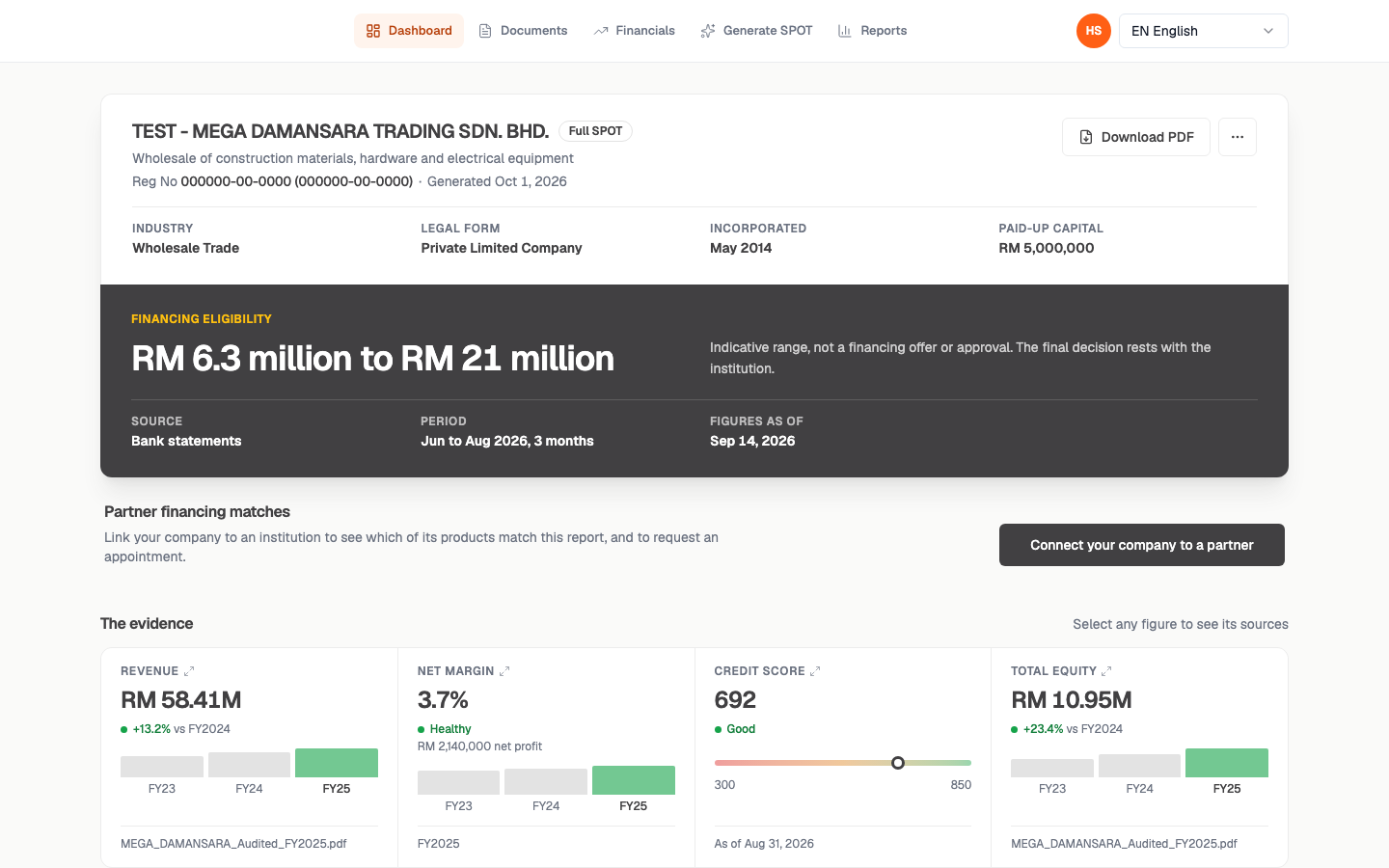
Select any figure and the details dialog names its source and period. When a figure has no data behind it, the tile shows a dash rather than a guess — an empty answer is the honest one, and adding the missing document fills it on your next generation.
Evidence, strengths and watch-outs
Below the verdict, the evidence grid — titled The evidence — shows the core figures of your report — revenue, margin, credit standing and equity — each with its status word, a three-year trend and a source footer. Select any figure for its per-year provenance. Next to it, the assessment pairs Strengths with Watch-outs — what supports your application and what a lender is likely to ask about — followed by credit standing and ownership details from the report.
The Micro SPOT dashboard
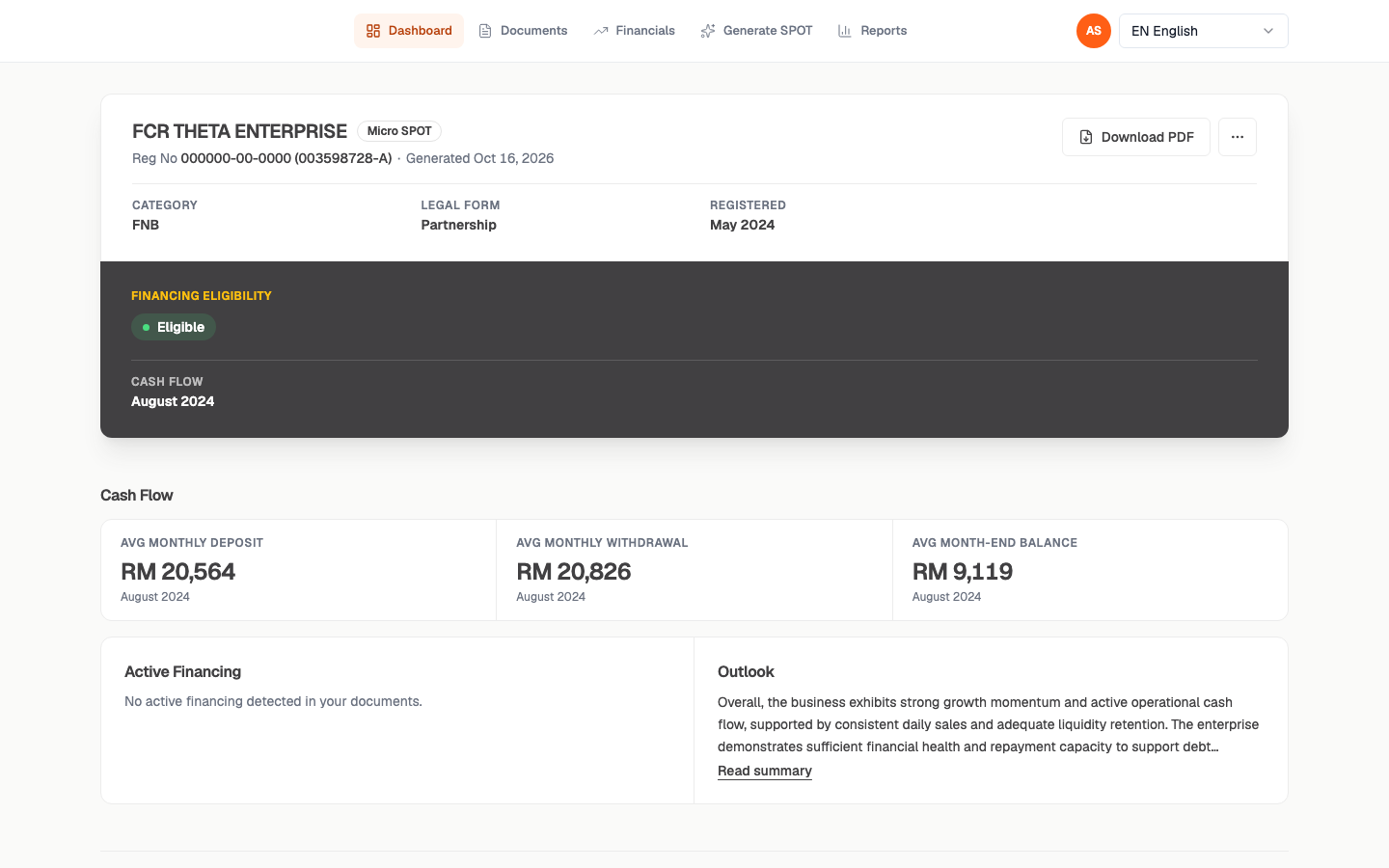
For a sole proprietorship or partnership the dashboard keeps the same shape with lighter content: the identity header from your SSM details, the Financing Eligibility verdict, a Cash Flow card with average monthly deposits, withdrawals and month-end balance from your statements, Active Financing with any arrangements detected in your documents, and an Outlook summary. When a Micro SPOT comes back without a financing result, a View reason panel explains what was missing.
Matched products from your institutions
The partner hub, titled Partner financing matches, lists products from the institutions your company is connected to, grouped into Eligible and Potentially eligible. Each row names the product, the institution, the rate, the tenure and the main document the institution asks for, with an indicative amount for your company on the right. The strongest three show first; Show all opens the rest.
This list is a reading of your latest report against the products of the institutions you linked — connecting an institution does not start a new assessment, and only linked institutions appear. If nothing is connected, the hub offers Connect your company to a partner; see Institutions and appointments.
Strengthen your report
The Strengthen your report panel answers one question: what would make the next report stronger? It shows your Report readiness score — a measure of how complete and evidenced the report is — and a row for each part of the report with the documents it is built from and which are still missing.
Three things to know about the score:
- It measures completeness, not creditworthiness. The page says so in its own words: it is not a credit score and says nothing about how strong your business is.
- It is recalculated from the documents you have on file right now, so adding a document moves it before you generate again.
- New documents only fill the report itself when you generate again — the panel’s note and its single Generate again button exist for exactly that.
The panel also lists what matched products asked for, and — when a newer audited year or fresher bank statements would change your figures — says so directly.
The getting-started checklist
For the first two weeks after your first completed Full SPOT, a one-line Getting started summary sits above your company header. Opening it shows five steps: verify your company identity, generate your first report, review matched products and book a consultation, upload your CTOS/CCRIS credit report, and download the official PDF. Steps tick themselves as you go, and the checklist disappears once the window passes. The checkbox state is kept per browser, so it reflects the device you are on, not the account.
Statuses you can see
| What the dashboard shows | Meaning |
|---|---|
| Your SPOT is being generated | A generation is running. You can leave the page and come back anytime; the panel links to live progress. |
| Regeneration in progress. Your current report stays available below. | A new run is under way; the existing report remains visible until the new one replaces it. |
| Your latest report could not be generated | The newest generation failed. Your previous report is still shown; retry from the banner or the Generate page. |
| A banner reading ”… document(s) could not be read” | Reports use only successfully read documents. The banner links to Documents to replace them. |
| You are offline | Updates are paused and resume automatically when the connection returns. |
What happens next
Open the whole report with the header button
View full report, or download it; see Reports and PDF. To raise the readiness score, follow the Add in Documents links in the strengthening panel, then generate again.