Reading the analysis modules
Analysis modules are the focused analyses SPOT runs on top of a company’s documents: what financing the company could carry, which of your products fit, how its bank account behaves, how ready its technology is, how much contracted work it has secured, how its existing facilities are holding up, and whether its documents contradict each other. Both Institutional Subscribers and the Odela team can open them, and both can start or re-run an analysis; the results are the same for everyone, except that the Bank Facility Annual Review shows each lending institution only its own review.
Open a company’s modules from the Modules tab on its details page, or from the Modules link on a Full SPOT row in the report list.
The module list
The list shows every module you can open at all times, whether or not a result exists, so what ran, what failed and what has never run read in one place. Six modules are listed for every Institutional Subscriber; the Bank Facility Annual Review is listed only for institutions that lend. Each row shows the module name, when it was last generated, its status, a short result, and the available action:
| Status | Meaning |
|---|---|
| Pending | Queued to run |
| Processing | Running; the row shows the current step |
| Completed | A result is ready |
| Completed with warnings | A result is ready, with caveats shown on the detail page |
| Failed | The run stopped; the row shows how far it got |
While anything is running, the list refreshes itself — you do not need to reload the page.
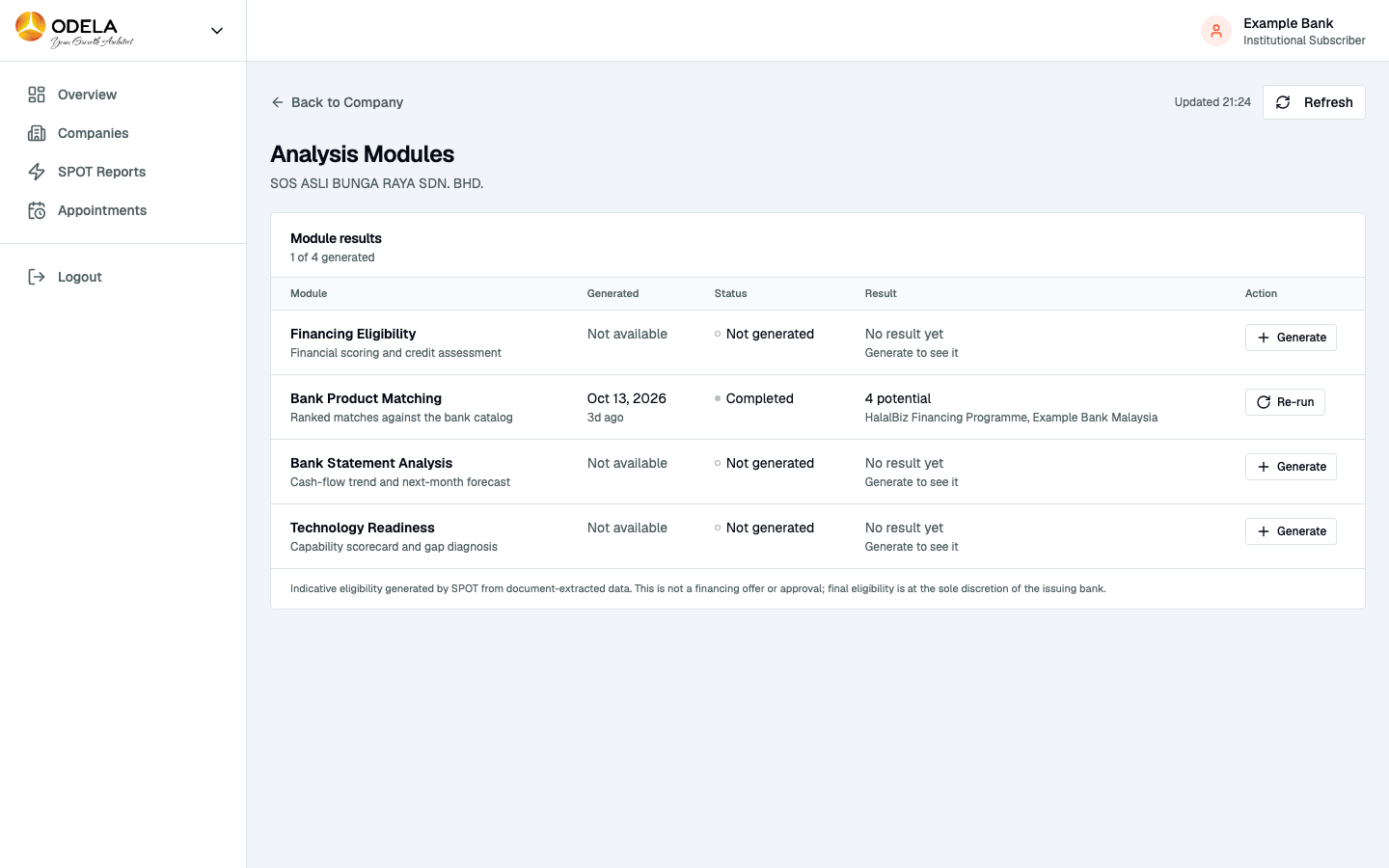
Starting, retrying and re-running
The action button depends on the row’s state:
| Row state | Action | What happens |
|---|---|---|
| No result yet | Generate | Starts the analysis for the current SPOT |
| Failed | Retry | Runs the failed analysis again, from the beginning |
| Completed | Re-run | Asks for confirmation (“This runs the analysis again and replaces the current result when it finishes”), then replaces the result with a fresh run |
Two things worth knowing:
- Results are tied to a SPOT. If the underlying report has since been regenerated, a module result is marked “Based on an earlier SPOT” — re-run it to bring it up to date.
- A failure is visible, not silent. The detail page shows the stored error and the step the run stopped at, with a Retry button.
Generating a Full SPOT itself is an Odela team action. Modules, however, can be generated, retried and re-run by Institutional Subscribers for their linked companies.
Financing Eligibility
The headline is a verdict chip — Eligible, Conditionally eligible or Not eligible — with a strength score and an indicative financing range. The score comes from five weighted dimensions, shown in the scoring breakdown in this order:
- Financial Health — leverage, liquidity and margin levels and their year-on-year trends, and revenue consistency.
- Credit Standing — the company’s credit-bureau position: credit score, SME health rating, facility utilisation, asset backing, charges and litigation.
- Repayment Capacity — revenue growth, interest coverage, debt against operating cash flow, working capital, existing financing burden, dishonoured cheques, and profit and cash-flow trends.
- Aging Risk — overdue receivables, long-overdue concentration and customer concentration in the aging list.
- Governance Readiness — management team size, beneficial-ownership disclosure, shareholder base and active legal cases.
Opening a dimension lists its factors with the values that were used, so a score can be followed down to the inputs. The page also states which inputs were missing — a missing audited statement or credit report lowers what the module can say, and the “Path to full eligibility” panel names the documents that would improve the result. Tabs cover the scoring overview, the financial statements behind it, and the risk assessment with recommendations.
Bank Product Matching
This module compares the company against your institution’s product catalog. The key figures show how many products matched, an indicative financing capacity, and data completeness. Below, each matched product is listed with:
- a status — Eligible or Potentially eligible;
- a fit score showing how close the company is to the product’s criteria;
- an indicative amount, indicative rate, tenure and collateral requirement;
- expandable criteria evidence, sorted into what the company met, what it did not meet, and what could not be confirmed from the documents — with the source document for each met criterion.
Two panels turn the misses into a worklist: To firm up eligibility collects the uploads or confirmations that would settle open criteria across products, and Near misses lists products the company almost qualifies for with the exact unmet requirements. If nothing matches, the module names the most common blockers instead.
Bank Statement Analysis
The module needs at least three months of bank statements and reads them account by account:
- Cash flow — monthly credits and debits with the net movement, charted and tabulated.
- Credits and debits by category — where money comes from and goes, including statutory contributions, with transaction counts and each category’s share.
- Banking conduct — balance maintenance, overdrafts and returned cheques, and the overall transaction pattern.
- Next-month projection — a projection of credits and debits for the coming month, with a clear “not enough statement history” state when history is short.
Each statement tab shows a reconciliation status; where the engine could not verify something, a reconciliation note says so rather than passing over it silently.
Technology Readiness
A capability scorecard across three areas — Technical, Operational and Commercial — combined into a composite score with a risk band, followed by a diagnosis of where technology adoption gaps (including AI-related productivity gaps) sit and what they cost the business. Where a score cannot be computed from the documents, the panel says “Not available” or “Not scored”.
Contract & Order Book
The order book of the company’s contracts: the contracted value, how much is delivered and the backlog still to be billed, with a runway for each contract and for the portfolio. A scorecard rates how bankable the contracts are, and facility readiness says which kinds of contract-backed financing they could support and what holds them back. Alerts and warnings list what to look at first. The module needs contract documents; contracts awarded by the company to others are excluded. See Module: Contract & Order Book.
Bank Facility Annual Review
Listed only for institutions that lend. It reviews your own facilities with the company: the facility schedule from your letter of offer, ten checks (covenants, credit conduct, litigation, dishonoured cheques and the share of turnover through your account), a Clean, Watch or Escalate review flag with its triggers, and an indicative action. A check without evidence is shown as unknown and the coverage list names what to upload. Your letter of offer is visible only to you. See Module: Bank Facility Annual Review.
Cross-Document Consistency
Each rule reports Flagged, Clear or Not evaluable with its reason, so “nothing flagged” is never confused with “nothing to compare”. The result is a snapshot from when you generated or re-ran it; it does not refresh on its own. A flag is a reason to open the linked documents, not a finding. See Module: Cross-Document Consistency.
Interpreting every result
All financing indications are engine output computed from uploaded documents. They support your own credit review; they are not an offer or an approval.
What happens next
- Bring the worklist into your workflow: set an owner and review status in Case tracking.
- Missing inputs? Ask the SME to upload, or upload on their behalf — see Documents.