Working with the companies list
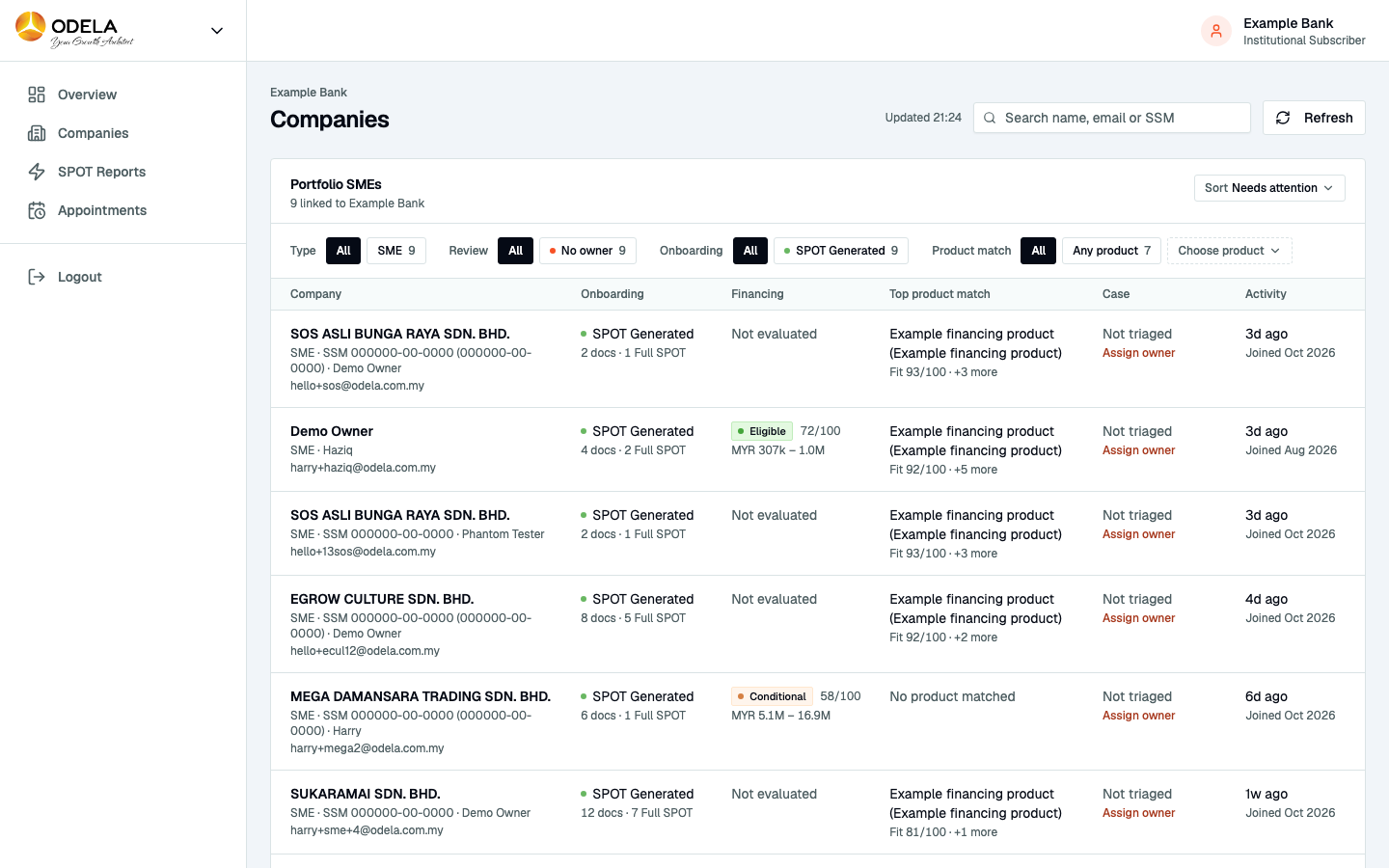
The Companies page lists every company linked to your institution — the same set the Overview totals are built from, so the row count here always equals the Overview’s portfolio figure. From this one list you can filter the portfolio by company type, onboarding stage, review status and product match, and keep each case’s owner and review stage current without opening the company.
Before you start
- Sign in to the partner portal.
- Companies appear here only once they are linked to your institution — through a referral sign-up or a recorded arrangement. An empty list means no links exist yet.
Read a row
Each row shows a value with a short line underneath:
| Column | What it tells you |
|---|---|
| Company | Name, with its type, registration number and contact person underneath |
| Onboarding | The derived readiness stage (Track 1), from Referred to SPOT Generated |
| Financing | The latest eligibility verdict with its indicative range |
| Top product match | The best-matched financing product, once a report exists |
| Case | Review status (Track 2) and the assigned owner, editable inline |
| Activity | Last activity, with the date the company joined underneath |
Filter the list
Four filter groups sit above the list, each chip showing how many SMEs in the whole portfolio match:
- Type — Micro, SME or Corp company type.
- Review — the Track 2 review statuses your team sets, plus No owner for post-report SMEs without an assignee.
- Onboarding — the derived Track 1 stages, from Referred through SPOT Generated.
- Product match — one of your catalog products, or Any product for SMEs matched to anything.
Filter choices are carried in the page address, so a filtered view can be shared or bookmarked and will show the same rows to a colleague. Counts on the chips are portfolio-wide, not counts of the currently displayed page.
Update a case inline
In the Case column you can set the owner (a free-text label with suggestions from labels your institution has used before) and paste a link to your CRM record for that SME. Changes save immediately. These are the same case facts described in Case tracking; pre-report SMEs show “Not triaged” until your team sets a review status.
What the list cannot show
- Companies not linked to your institution — by design, they are unreachable from the partner portal.
- Companies that were unlinked disappear from the list, the Overview totals and every filter automatically.
What happens next
Select a company to open its details. The list footer carries the indicative-eligibility disclaimer that applies to the financing column.