Reading the portfolio overview
Overview is the first page you land on as an Institutional Subscriber. It answers the management questions — how many SMEs are under us, what is their combined verified revenue, how much financing they are looking for, and how they fit our products — without asking the Odela team for an export. Odela team accounts never see this page; it is partner-only.
The page reads top to bottom: key figures, largest opportunities, what needs attention, the case pipeline, segments, and product fit. Every list links into the filtered Companies list, so a number you see here can always be opened as the exact set of companies behind it.
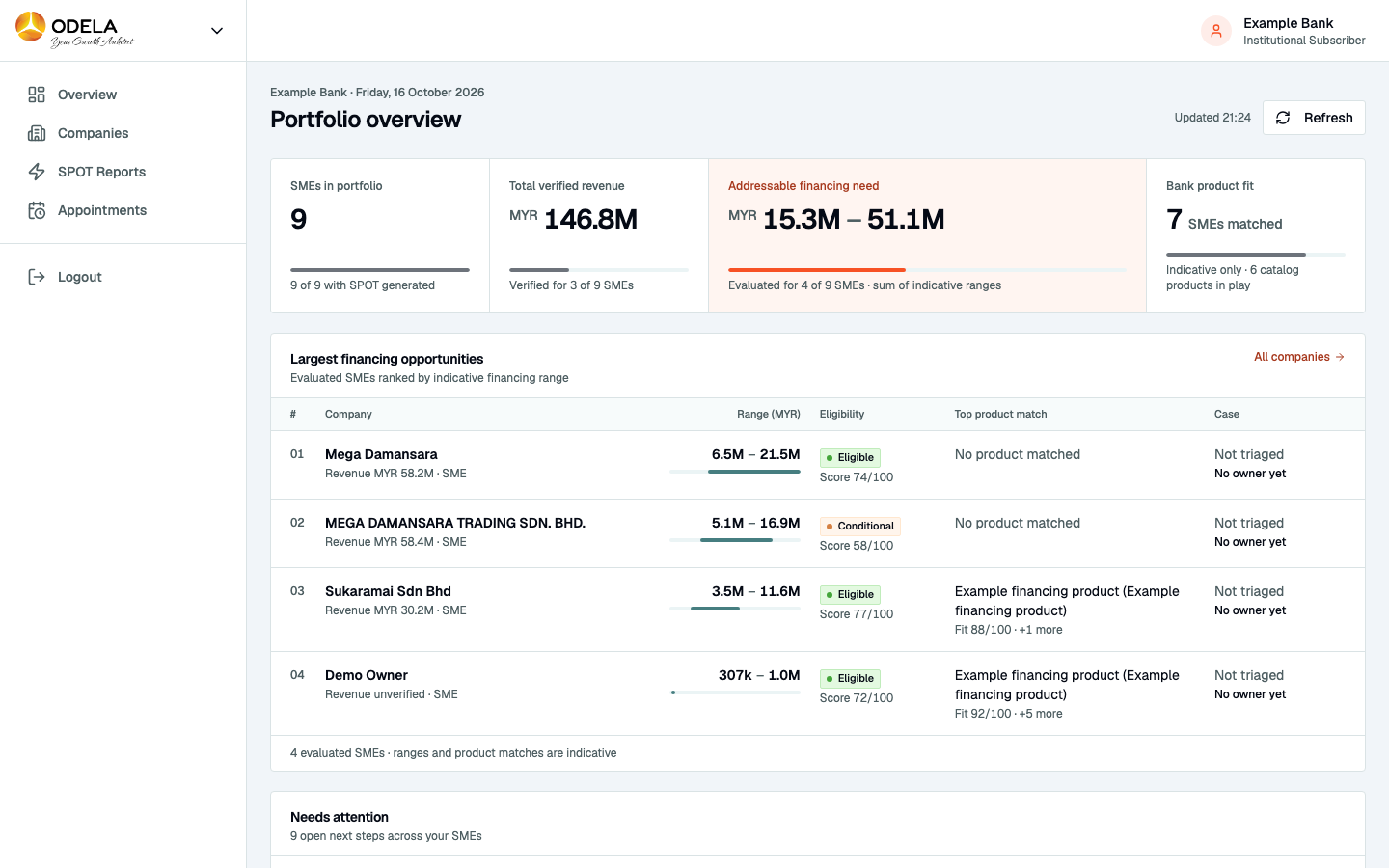
Key figures and coverage labels
Four figures head the page. Three of them are sums over part of your portfolio, so each carries a coverage label underneath — read it before quoting the total:
| Figure | What it counts | Coverage label |
|---|---|---|
| SMEs in portfolio | All companies linked to your institution | How many have generated a SPOT report |
| Total verified revenue | Annual revenue as verified by the engine, summed | “Verified for X of Y SMEs” |
| Addressable financing need | The combined indicative financing range across evaluated SMEs — the pipeline your institution could address | “Evaluated for X of Y SMEs” |
| Bank product fit | How many SMEs matched at least one of your products | Marked “Indicative only” |
The coverage label is mandatory wherever a total covers only part of the portfolio, so a total can never look complete while silently missing companies. Companies whose revenue has not been verified never enter the revenue sum — they appear as an Unverified group in the segments instead.
The financing need figure adds up the engine’s indicative ranges, not each SME’s stated loan request. Treat it as the size of the addressable pipeline, not as committed demand.
Largest financing opportunities
Directly under the figures, the five SMEs with the highest top of their indicative financing range are listed, one row each: company, range, eligibility verdict, top product match, and the current case status with its owner. It is a ranked shortlist of where review attention pays off first; select a row to open the company.
Needs attention
This panel lists the open next steps across your SMEs, and only categories that currently apply are shown:
| Next step | Meaning |
|---|---|
| Assign an owner | A SPOT report exists but nobody on your side owns the case yet |
| Follow up on requested info | Cases marked as waiting for information from the SME |
| No Full SPOT yet | Documents are verified but no Full SPOT has been generated (some may already have a Micro SPOT) |
| Documents incomplete | The uploaded document set is not yet enough to generate a report |
| No documents yet | Registered SMEs that have not uploaded anything |
Each column names the SMEs involved and links to the matching Companies filter, so the count you clicked always equals the rows you land on.
The dual-track case pipeline
Two bars show where your portfolio stands, using the two-track model explained in Case tracking:
- Onboarding readiness (Track 1) is derived by SPOT from system state — from first referral through to a generated report. You cannot edit it.
- Review and triage (Track 2) is the status your team sets — New, In Review, Awaiting Info, Discussion, Approved, Rejected or On Hold — counted only over SMEs that already have a SPOT report, plus a separate count of unassigned cases.
Selecting a stage or status chip opens the Companies list filtered to exactly those SMEs.
Segments
Two charts group your portfolio: industry (each SME in one Odela industry category, with anything unmapped shown as “Unclassified” so nothing disappears from the chart) and revenue size (the same verified revenue as the key figure, grouped into bands, with unverified SMEs in their own group). Revenue bands use Odela’s default grouping until your institution’s credit policy is applied.
Bank product fit
The last section rolls up the Bank Product Matching results across your portfolio: one row per catalog product, grouped by institution, showing how many SMEs are an eligible match and how many are potentially eligible. Selecting a product opens the Companies list filtered to the SMEs matched to it.
What happens next
Open a company from any list to see its documents, reports and case — start with Companies. To understand where the figures come from, read How SPOT works.